Running the business · Global guide
Restaurant inventory management: a simple weekly system
A simple restaurant inventory management system: what to count, how to set reorder levels, a weekly count routine and a food cost check you can run.
Operating in Nepal? Read the Nepal guide
Most small restaurants do not need recipe-level costing on day one. They need to know what is running low before service, not halfway through it. A good restaurant inventory management routine answers three questions every week: what do we have, what do we need to order, and is anything disappearing faster than it should? This guide sets up that routine with a short item list, sensible reorder levels and a count that takes less than an hour.
Decide what to count, and what to leave out
Counting everything sounds thorough, but a 300-line stock sheet is the one nobody finishes. Start with the items that cost the most or run out the most. For many kitchens that is 20 to 40 lines.
- Proteins: chicken, mutton, fish, paneer, eggs.
- Dairy and oils: milk, butter, cream, cooking oil.
- Dry stores you use daily: rice, flour, sugar, lentils.
- Drinks that sell fast: bottled water, soft drinks, beer, coffee beans.
- Anything expensive in small amounts: saffron, imported cheese, specialty spirits.
Leave out salt, small spices and cleaning supplies at first. Add them later if they start causing problems.
Use the units you buy in
Record each item in the unit your supplier sells it in: kg, litre, crate, packet or piece. If you buy cooking oil by the 15-litre tin, count it in litres or tins, not in ladles. Mixed units are the most common reason counts stop matching orders.
Set a reorder level for each item
A reorder level, sometimes called a par level, is the quantity that tells you to order again. A simple way to set one:
- Estimate how much you use on an average day.
- Count how many days your supplier takes to deliver after you order.
- Multiply the two, then add a buffer for a busy day.
For example, if the kitchen uses about 3 kg of chicken a day and the supplier delivers the next day, you need at least 3 kg to cover the wait. Add a day’s buffer and set the reorder level at 6 kg. When the count falls to 6 kg, you order. Review the levels after a month; they will be wrong at first, and that is normal.
Run the count the same way every time
- Count at the same time, ideally before a delivery arrives or after closing.
- Walk the storeroom in the same order as your list, shelf by shelf.
- Count perishables like meat and dairy daily; dry stores weekly is enough.
- Have two people count the most expensive items.
- Record the count straight away rather than from memory at the end.
Rotate stock as you count: older items move to the front so they are used first. This is often called first in, first out, and it is the cheapest way to cut waste.
A basic food cost check
Once you have two counts and your purchase receipts, you can check your food cost for the period:
Food cost % = (opening stock + purchases − closing stock) ÷ food sales × 100.
If opening stock was worth 40,000, you bought 60,000, closing stock is worth 35,000 and food sales were 200,000, your food cost is 65,000 ÷ 200,000, or 32.5%. Compare it month to month. A sudden jump usually means waste, portioning drift or missing stock, and tells you where to look.
Tracking stock in GiveMyMenu
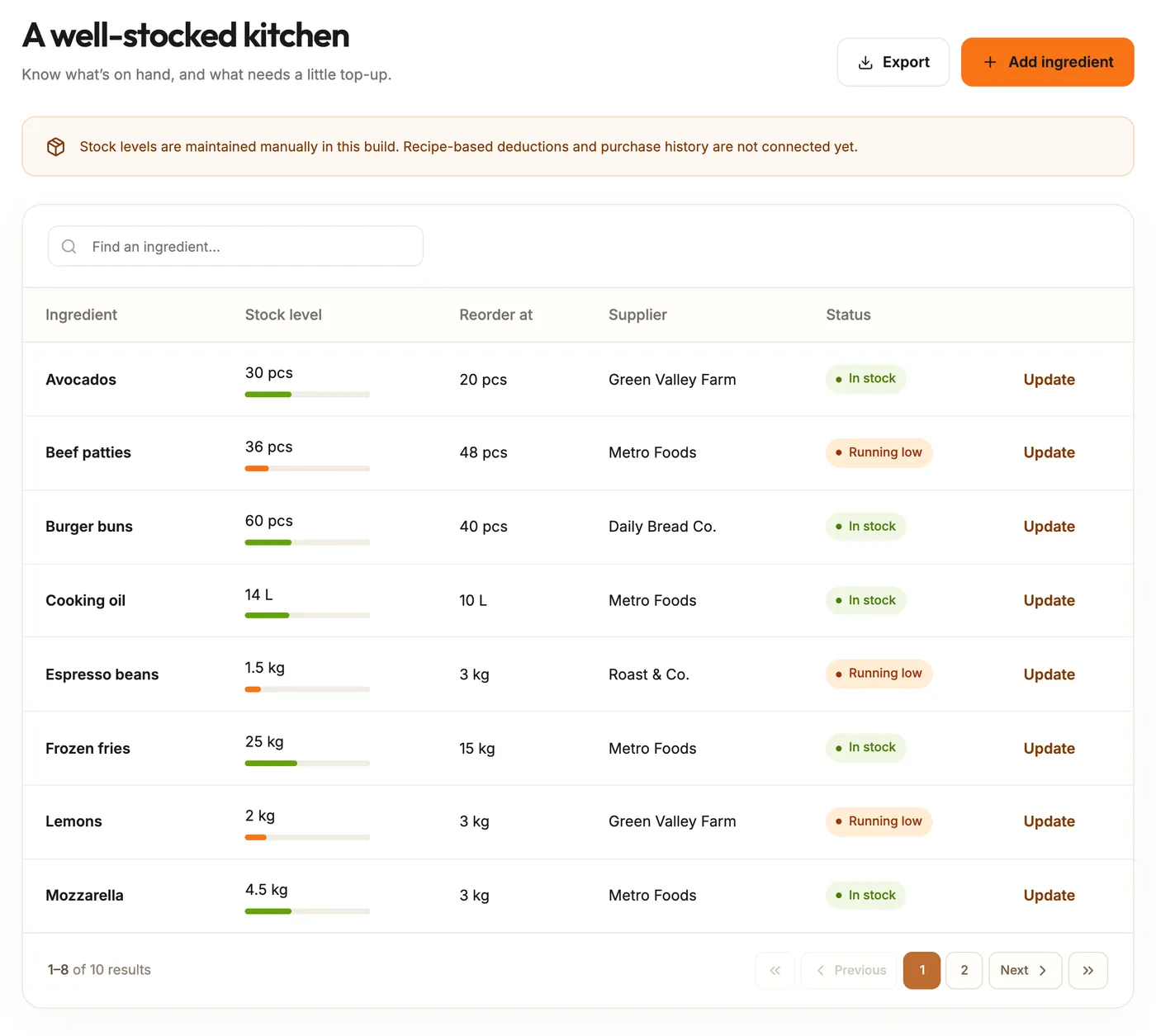
GiveMyMenu’s inventory page is included on Starter and above, and during the Pro trial for new accounts. For each ingredient you record the unit, the quantity on hand, the reorder level and the supplier. Items at or below their reorder level are marked as running low, so the order list is clear at a glance. You can search the list and export it as a CSV file for a spreadsheet or your accountant.
Stock levels are updated by hand: after a count, after a delivery, or when something is used up. GiveMyMenu does not yet deduct ingredients automatically when a dish is sold, and it does not keep a purchase history. For a small kitchen running the weekly routine above, a manual list is often enough. Keep purchase receipts separately for the food cost check.
When you need more than a stock list
Consider dedicated inventory software when you need recipe costing for every dish, stock transfers between several locations, purchase orders sent to suppliers, or automatic deductions as each plate sells. Those tools take more setup and more discipline to keep accurate, so start them only when the simple routine is working.
Common mistakes
- Counting in different units each week.
- Setting reorder levels once and never revisiting them.
- Updating stock only when something runs out.
- Counting during service, when items are moving.
- Treating the count as accounting rather than as a tool to order better.
Try it on one table
Set up a few dishes and follow an order through to the kitchen and bill.